Overview
mrD-Signals Premium is a composite TradingView study built around eleven independent modules that share one chart — Waves Trend, Contrarian, Advanced MTF, Trend Cloud, Trail Cloud, RSI Band, Trend Catcher, Key Level, Candle Coloring, the Statistics Dashboard, and module-level Alerts.
mrD-Signals Premium is a composite TradingView study built around eleven independent modules that share one chart. Each module is a self-contained engine — you enable the ones that match your style, leave the others off, and the modules stay decoupled so a Waves Trend signal does not depend on RSI Band being visible.
This is the overview for the study. Each module has its own dedicated settings page linked from the list below. To install the study see Link your account & add the studies; for chrome and palette retune that should happen before any indicator is added, see TradingView Workspace Setup.
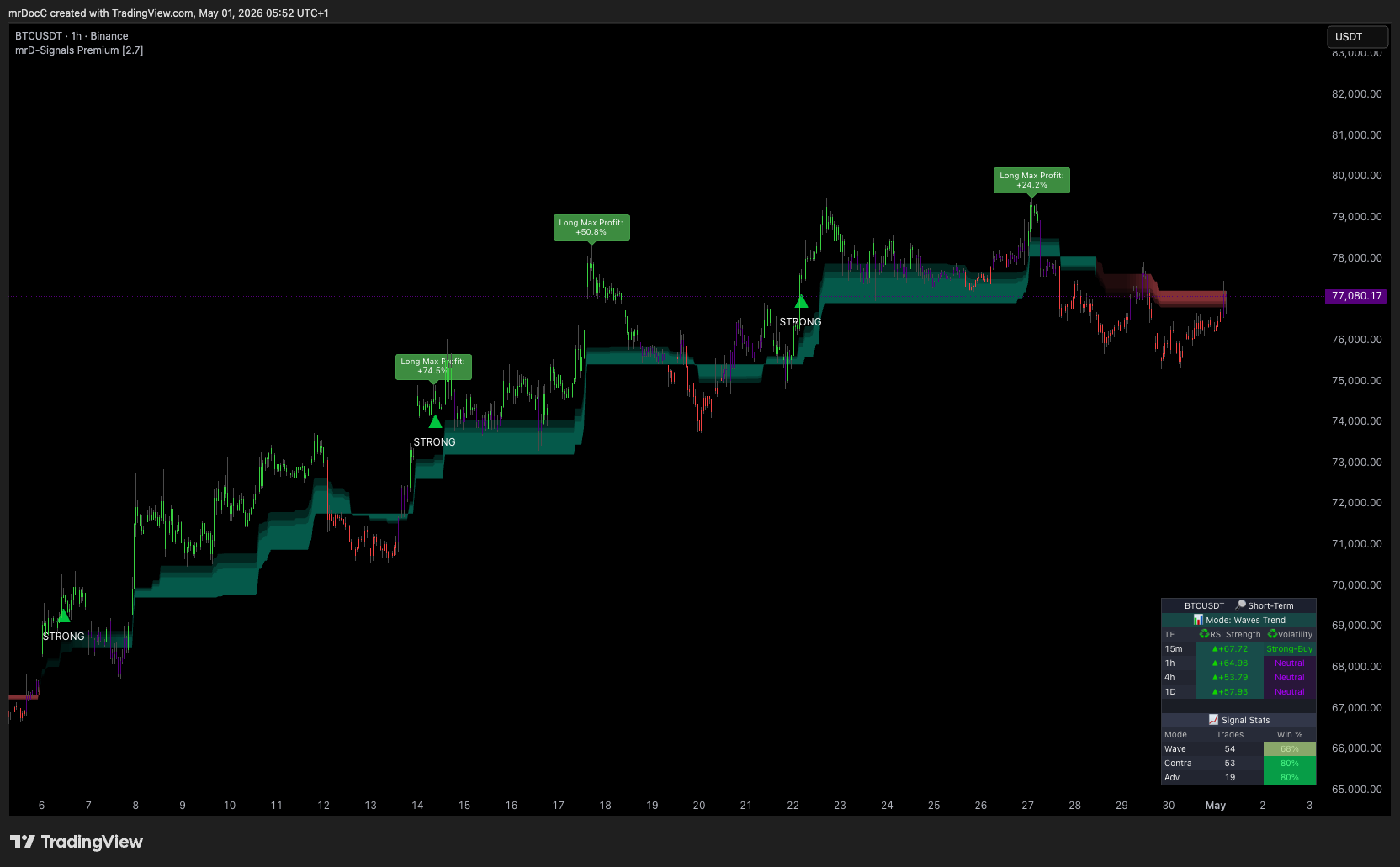 One chart, eleven modules. The dashboard at the bottom-right is live — it tracks every signal the study has emitted on the current symbol and timeframe.
Who this study is for
The study is designed around three trader profiles:
- Day-traders and scalpers — 1m–15m, fast entries, hard requirement on low false-signal rate during chop.
- Swing traders — 1H–4H, identifying the main wave inside a higher-timeframe range, entering at the confirmed setup.
- Position traders — 1D–1W, multi-timeframe alignment, intraday noise filtered out.
You do not pick a profile per-trade. You pick it once in the study settings (Short-Term / Mid-Term / Long-Term / Auto Detect) and the module parameters auto-adapt to the chart timeframe — the same Short-Term profile runs tighter filters on 15m than on 4H because lower-timeframe noise is inherently higher. This is why a single study can serve three styles without forcing you to clone the indicator with different parameter sets.
The eleven modules at a glance
Click any module name to open its dedicated settings page.
Signal engines
These are the three modules that print BUY / SELL triangles on price.
- Waves Trend Signals — the default-on trend-entry engine. Prints a STRONG BUY / STRONG SELL triangle only when multiple confirmation filters agree at the same time (trend agreement, signal clarity above noise floor, volume confirmation, anti-sideways and anti-counter-trend guards). The module most users keep enabled by default.
- Contrarian Signals — five-timeframe ATR composite that hunts the extreme reversal points (peaks of long uptrends, valleys of long downtrends). The reverse-side complement to Waves Trend.
- Advanced Signals — a stricter cousin of Waves Trend that adds higher-timeframe confluence on top of the entry. Two tiers — STRONG (3/3 confluence) or NORMAL (2/3). Non-repainting; locks in on bar close.
Regime and dynamic-zone modules
These modules paint coloured zones on the chart that act as filters and trailing stops.
- Trend Cloud — the regime cloud (green = uptrend, red = downtrend) with three Fibonacci layers acting as dynamic support / resistance. The single most useful filter when combined with any signal module.
- Trail Cloud — a dynamic trailing zone that tracks the active trend and provides a moving stop / target reference. Pairs with Waves Trend for trail-based exits.
Visualisation modules
These modules add coloured overlays to make momentum, pullbacks and key prices visible without sub-panes.
- RSI Band — momentum visualisation painted on price, not in a sub-pane. Overbought / oversold zones auto-highlighted so you read momentum and price action with one eye-track.
- Trend Catcher — pullback hunter that fires when price retests a trailing line in the trend direction. Anti-chop guarded.
- Key Level — auto-drawn point of control, swing highs / lows and round numbers. Caps the number of levels intentionally so the chart stays clean.
- Candle Coloring — bar-tinting layer that paints every candle by the active trend regime. Provides a continuous regime read between discrete signal triangles.
Dashboard and alerts
These two sit alongside the trading modules to surface state and route signals outward.
- Statistics Dashboard — live win-rate panel docked inside the chart that tracks the historical performance of each signal mode (Waves Trend, Contrarian, Advanced) on the currently loaded symbol and timeframe, plus multi-timeframe RSI strength and volatility readings.
- Alerts — module-level alert conditions for push, email and webhook delivery. Lists every alert key the study exposes and explains how to combine them with TradingView's alert frequency settings.
Profiles and timeframes at a glance
Recommended starting configurations per trading style:
Scalping (1m–5m)
- Profile: Long-Term (kills intraday noise).
- Modules on: Waves Trend Signals, Trend Cloud (single layer), RSI Band (low smoothing), Candle Coloring.
- Modules off: Contrarian (too few bars for the five-TF composite to be useful), Trend Catcher (1m pullbacks rarely repay), Key Level (chart is too dense for many horizontal lines).
Day trading (15m–1H)
- Profile: Mid-Term.
- Modules on: Advanced Signals (STRONG only or 2/3 confluence), Trend Cloud (multi-layer Fibonacci), Trend Catcher, Trail Cloud.
- Modules off / optional: Contrarian only at session opens / closes where reversals genuinely cluster.
Swing trading (4H–1D)
- Profile: Mid-Term or Short-Term depending on holding period (high-TF charts handle responsive settings well).
- Modules on: Waves Trend Signals, Trend Cloud (multi-layer), Contrarian, Key Level, Trail Cloud. Use Key Level's POC and swing highs / lows to place limit orders.
- Modules off / optional: RSI Band can stay on for the momentum reference.
Position trading (1D–1W)
- Profile: Short-Term (clean high-TF structure rewards responsive settings).
- Modules on: Waves Trend Signals, Trend Cloud (multi-layer), Key Level (full set of long-range levels), Candle Coloring.
- Modules off: Trend Catcher (1W pullbacks are not really pullbacks). Contrarian very selectively — Long-Term reversals are rare but consequential.
Common mistakes to avoid
- Running every module on by default. The eleven modules are independent on purpose. Pick the three or four that match the timeframe you trade and disable the rest — a chart with eleven coloured layers is less readable than a chart with four.
- Ignoring Trend Cloud. Most "false signal" complaints with composite indicators trace back to taking signals against the prevailing regime. The cloud is the cheapest filter to add and the most effective.
- Treating the dashboard win rate as a forecast. It is a historical fit measure on the data currently loaded, not a probability the next trade will win.
- Tweaking parameters before reading the chart. The defaults are tuned for major crypto, FX majors, indices and blue-chip equities. If signals look wrong on a chart, first check whether the timeframe / profile combination makes sense for the asset before reaching for the parameter sliders.
- Forcing the study onto unsuitable markets. Penny stocks, exotic FX and synthetic CFDs have unreliable volume, which means the volume-confirmation filters on Waves Trend and Contrarian cannot do their job. Either turn volume confirmation off for those assets, or accept the study is the wrong tool for the market.
What this study does not do
- It does not replace market context. News, FOMC announcements, earnings, macro catalysts — none of these are visible to a chart indicator. Read your calendar alongside the chart.
- It does not catch exact tops or bottoms. Waves Trend is a trend-following engine; Contrarian aims for reversals but still requires confirmation. There is no setting that emits the perfect-top signal.
- It does not size positions or set stops. The study draws levels; you decide risk per trade.
- It does not learn from your trades. The dashboard tracks historical signal performance on the loaded bars, not your personal P&L.
Where to go next
Start with the engine you plan to trade first, then add filters incrementally:
- Waves Trend Signals — the default-on entry engine for most workflows.
- Trend Cloud — the regime filter that turns Waves Trend from good to excellent.
- Statistics Dashboard — figure out which signal mode actually fits the asset you are trading.
- Alerts — fire push / webhook alerts on the modules above so you stop babysitting the chart.
External:
- TradingView alerts (general) — the platform-level alert setup that the module-level alerts ride on.
- Link your account & add the studies — install or update the invite-only study if you do not have it on your chart yet.
- TradingView Workspace Setup — the chrome, palette and drawing-tool retune that should happen before any indicator is added.
- Introduction — how this study sits inside the wider mrD-Indicators suite (Smart Ranges, Open Interest, RSI Premium, mrDAlgo).