Trail Cloud
Trail Cloud is the slow structural trend layer inside mrD-Signals Premium — designed to flip only when the trend has truly turned. Provides a trailing-stop anchor and three internal pullback bands (shallow / mid / deep) so every pullback becomes a ready-made entry plan. The reference frame for swing trading.
Trail Cloud is the slowest, most "anchored" trend layer in the mrD-Signals Premium overlay stack. Where Trend Cloud hugs price tick-by-tick, Trail Cloud is engineered to only flip when the trend has truly turned — it ignores the short-lived bumps the market throws at you and provides the reference frame your swing trades anchor to.
It does three jobs at once: defines the structural bias, supplies a trailing-stop anchor you can actually trust, and pre-prints the pullback zones that turn every pullback into a ready-made entry plan.
 Trail Cloud's job is to be slow and structural — flips are rare and meaningful.
What this module does
Mental model: if Trend Cloud is the heartbeat and Trend Catcher is the breath, Trail Cloud is the skeleton — slower, flips less, but when it speaks it is structural.
Four pieces of information at a glance
| Element | What it tells you |
|---|---|
| Cloud colour | Structural bias — green = bull, red = bear. |
| Anchor line (bottom edge in uptrend, top edge in downtrend) | Dynamic stop-loss and the level where the trend remains valid. |
| Inner bands | Shallow / mid / deep pullback zones — entry pricing levels. |
| Price position vs the cloud | Trend phase — running, pulling back, or near reversal. |
The 3D depth gradient
Trail Cloud is built from three overlapping fill layers, not a single uniform shade. Each fill stretches from the anchor line up to a specific pullback level:
- The densest area (all three layers overlap, right next to the anchor) — the hard core of the trend where price reacts most strongly.
- The lightest area (only one fill, next to price) — the tolerance edge where price can wobble without breaking the trend.
- The middle gradient — the pullback bands transitioning from one to the other.
This lets you read pullback depth at a glance: a pullback touching the light area is harmless; a pullback diving into the dense area warns that the trend is losing strength.
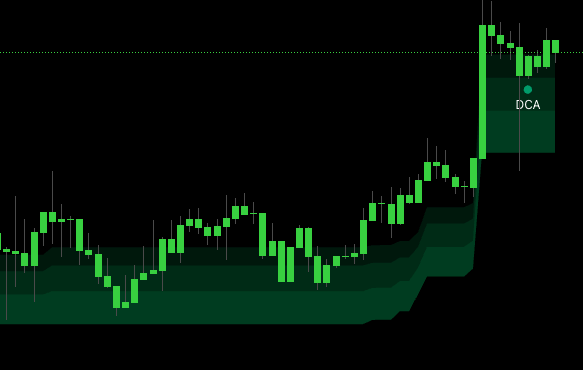 Anatomy: light band = shallow pullback, mid band = standard pullback, dense band = deep pullback, anchor = where the trend is invalidated.
Reading Trail Cloud in 30 seconds
The four phases
| Phase | What is happening | Action |
|---|---|---|
| 1. Outside cloud, running | Price far above (long) or below (short) the cloud — trend obvious. | Hold any open position; do not chase tops / bottoms. |
| 2. Pullback into light band | Shallow pullback — normal trend breath. | Best entry in cloud direction. A+ setup. |
| 3. Pullback into dense band | Deep pullback — opposing pressure showing up. | Still tradeable; tighter stop, size 50 – 75%. |
| 4. Price at / through anchor | Decision zone — trend transitioning. | Stand aside. Wait for a clear close + flip confirmation. |
When does the trend really flip?
Trail Cloud uses two anti-whipsaw filters so the anchor and cloud colour do NOT flip the moment price crosses the line:
- Price must close past the anchor by a meaningful margin (not just a wick).
- The opposite direction must be maintained for several consecutive bars (not a one-bar reversal).
You will sometimes see price punch through the anchor for one or two bars while the cloud holds its colour — that is by design, not a bug. The system is waiting for confirmation. When the cloud actually flips, the signal is exceptionally trustworthy precisely because of those filters.
The anchor is the smartest stop-loss you will set
The single most valuable use of Trail Cloud: stop-loss placed just past the anchor.
- LONG → stop a few ticks below the cloud's bottom edge (the anchor in an uptrend).
- SHORT → stop a few ticks above the cloud's top edge (the anchor in a downtrend).
Logic: if price clearly closes through the anchor, the trend has turned, the original reason for the trade is gone — exit. Never too wide, never too tight. This is a structural stop instead of an arbitrary one.
Trail Cloud in the broader study
Trail Cloud is the slowest layer in the four-overlay set. Each layer has its own personality:
| Layer | Personality | Best for |
|---|---|---|
| Trend Cloud | Fast — hugs price | Instant bias, scalp / intraday. |
| Trend Catcher | Medium — smooth line | Mid-term trend, swing trailing stop. |
| RSI Band | Macro — very slow | Long-term bias, swing / position. |
| Trail Cloud | Structural — slow + steady | Primary reference frame for swing trades. |
Confluence with the other layers
| Trail Cloud | Trend Cloud / Trend Catcher | Decision |
|---|---|---|
| Green | Green | A+ — system fully aligned, full size. |
| Green | Briefly red | B — likely a pullback; wait for the fast layer to turn green. |
| Green | Persistently red | Fast layer leading — warning, macro trend may flip soon. |
| Red | Red | A+ short. |
| Red | Briefly green | B — counter-pullback in downtrend; wait for fast layer to turn red. |
| Just flipped | Fast layer confirms | Structural reversal — highly tradeable. |
Confluence with Key Level
This is the strongest pair in the study:
- Trail Cloud green + price pulls back to a green Key Level box inside the cloud's pullback band = A+ long.
- Trail Cloud red + price pulls back to a red Key Level box inside the cloud's pullback band = A+ short.
- Trail Cloud anchor aligning with a Key Level box edge = a very strong stop / target zone.
Confluence with signal modules
| Signal module | How Trail Cloud combines |
|---|---|
| Waves Trend | Triangle prints inside the cloud's pullback band + same direction = clean entry. |
| Contrarian | Strongest when the Contrarian triangle prints at the deep band — full pullback then a reversal back toward cloud direction. |
| Advanced | Highest confluence when signal + Trail Cloud + Key Level all agree. |
Recommended setup
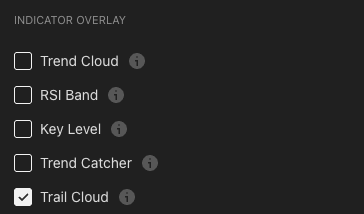
- Enable Trail Cloud in the indicator-overlay panel.
- Add at least one faster layer — Trend Cloud (intraday) or Trend Catcher (swing).
- Enable Key Level for the structural price map.
- Pick one signal source — Waves / Contrarian / Advanced — that fits your style.
Pre-trade checklist
- Trail Cloud colour is clear (not mid-flip).
- Price is in a pullback zone (touching light or mid band) — not running far outside the cloud.
- Clear candle reaction in the band (rejection / engulf / pin).
- The faster layer agrees.
- Same-direction Key Level near the price area (if available).
- Distance from entry to anchor is wide enough for a sane stop.
5–6 out of 6 → A+ full size. 4/6 → A full size. 3/6 → B half size. 2 or fewer → skip.
Trading playbook
Long setup 1 — shallow pullback (clean entry)
| Step | Action |
|---|---|
| Wait | Trail Cloud green + price pulls back to the outer band (light area). |
| Trigger | Bullish rejection candle inside the band (pin / engulf). |
| Entry | Market on confirmation, or limit at the inner edge of the band. |
| Stop | A few ticks below the anchor (bottom of cloud). |
| TP 1 (1/3) | Nearest swing high / lower edge of an overhead red Key Level. |
| TP 2 (1/3) | Prior swing high or structural target. |
| TP 3 (1/3) | Trail with the anchor — exit when price closes below it. |
This is the highest-R:R Trail Cloud setup — early entry on a pullback, structural stop, flexible targets.
Long setup 2 — deep pullback (last-chance entry)
Wait for a deep pullback into the inner band (dense area), require a strong bullish rejection at the deep band or anchor, and reduce size 50 – 75% (higher risk). Stop is tight against the anchor; first target is the mid band. Do not force entries — only act on a clear confirmation candle.
Long setup 3 — flip + retest (structural entry)
When Trail Cloud just flipped from red to green (rare, valuable event), wait for price to pull back to the outer band of the new green cloud, take the bullish trigger at the outer band, stop below the new anchor. Because of the double-filter on the flip, this is one of the most reliable setups the system produces — but the retest gives you a much better R:R than a market entry on the flip itself.
Short setups
Symmetrical mirror of the long playbook.
Sizing by confluence
| Confluence | Size |
|---|---|
| Trail Cloud + fast layer + Key Level + signal all agree | 100% |
| Trail Cloud + fast layer + Key Level (no signal) | 75% |
| Trail Cloud + signal (fast layer neutral) | 50% |
| Trail Cloud against persistent fast layer | 25% or skip |
Tips to improve outcomes
Count the pullbacks
In a healthy uptrend, price typically dips lightly into the outer band and bounces:
- Pullbacks 1 and 2 into the outer band → trend strong, enter with confidence.
- Pullbacks 3 and 4 still into the outer band → trend healthy but cooling — normal size.
- First pullback going into the mid or inner band after a long run → warning, trend may be losing energy.
- Pullback touching the anchor → late stage — do not enter; wait for a flip signal or a clean bounce off the anchor.
A flat anchor = a resting trend
When the anchor goes sideways for a long stretch instead of sloping with price:
- The trend is losing momentum — sideways or reversal incoming.
- Avoid continuation entries; switch to range-trading mode or stand aside.
- When the anchor starts sloping again → the trend is alive — return to the pullback playbook.
Thin cloud vs thick cloud
- Thick cloud = high volatility → stop must be wider (past the anchor) → R:R may be lower if targets are nearby.
- Thin cloud = quiet market → stop near the anchor is tight → R:R favourable.
- Cloud suddenly contracts after being thick → volatility is dropping, a breakout may be imminent (direction unknown). Stand by and watch.
Multi-timeframe Trail Cloud stack
The real power of Trail Cloud emerges when you stack timeframes:
- 1D Trail Cloud → macro bias; only trade in this direction.
- 4H Trail Cloud → primary swing TF; 4H pullback bands are entry zones.
- 1H Trail Cloud → confirms the fine-tune entry.
- 15m → trigger candle at the rejection point.
Rule: only trade when 1D and 4H Trail Clouds agree. If 1D is red but 4H is green, that is just a counter-pullback inside a bear macro — stand aside.
When to ignore Trail Cloud
Trail Cloud is not the right tool when:
- Tight sideways ranges. Anchor does not slope, cloud is razor-thin, every pullback hits every band. Use Key Level as your primary reference.
- Right after a gap or major news event. The cloud needs dozens of bars to stabilise — don't trust its signals in that window.
- Very low timeframes (1m / 5m). Trail Cloud is designed to be slow; on tiny TFs it lags structurally. Use Trend Cloud / Trend Catcher there.
Common mistakes
- Stop too tight near price. Ignoring the anchor and placing stop intuitively → noise sweep. Always anchor your stop to the anchor line.
- Entering during the running-outside phase. That is chasing the move. Wait for a pullback into the cloud.
- Dismissing Trail Cloud because it has not flipped yet. It is designed slow. Unflipped = macro trend has not turned — trust it.
- Trading against Trail Cloud "because it feels like a reversal". Fast way to lose money. A pullback ≠ a reversal. Until the cloud actually flips, the macro bias is the cloud.
- Fixed TP that ignores the anchor. Your final TP should trail the anchor, not be a hardcoded number.
- Enabling only Trail Cloud and nothing else. Trail Cloud is a reference frame, not a signal generator. You need at least one faster layer plus Key Level for entry triggers.
Common questions
Q. How is Trail Cloud different from Trend Cloud? Trend Cloud is fast — hugs price, flips often, used for intraday bias. Trail Cloud is slow + structural — flips rarely, used for swing / position bias and as the stop anchor. They complement each other; they do not replace each other.
Q. Where exactly should I place my stop? A few ticks past the anchor (below the bottom for longs, above the top for shorts). If the cloud is thick and your stop ends up wider than you would like, reduce size — do not move the stop closer.
Q. The cloud just flipped — should I enter at market right away? Better to wait for one retest into the outer band of the new cloud and enter there (setup 3 above). Entering on the retest gives you a much better R:R than chasing the flip at market.
Q. Does Trail Cloud work on stocks / FX / crypto? Yes — Trail Cloud is built on standardised price volatility, not asset-specific quirks. The cleaner the volume and price pattern (BTC, ETH, SPX, EURUSD), the more accurately it behaves.
Where to go next
- Trend Cloud — the fast bias layer that pairs with Trail Cloud.
- Key Level — the structural price map that combines with Trail Cloud anchors.
- Contrarian Signals — the signal module most often paired with Trail Cloud.
- Statistics Dashboard — check historical performance per signal mode on the loaded asset.
- Overview — back to the study overview.